| 发布时间:2025/01/03 11:22:49 发布人:admin |
|
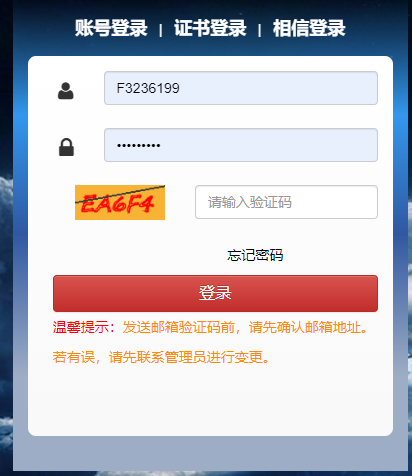
对账开票服务平台日常常见问题处理方法 1. 平台登录问题 登录目前有三种认证方式: l 账密+邮箱验证码 l 证书(需申请证书) l 相信(Foxconn内部人员) 常见问题有: I. 邮箱维护有误,无法登陆系统 这种情况请联系管理员,将系统登录账号和需要绑定的正确邮箱提供给管理员,管理员绑定后即可用该邮箱进行验证码的接收。 II. 邮箱维护正确,但无法收到邮箱验证码 这种情况,建议自查网络环境、邮件接收工具及防火墙设置,确认是否被拦截;或切换其他邮箱进行测试。 III. 可以登陆系统,但后续需要修改绑定邮箱 这种情况无需联系管理员,可自行进行修改,修改路径为:企业中心---企业管理---账号信息,若一个账号需要绑定多个邮箱,邮箱之间请用英文逗号(,)进行分割,比如:123@qq.com,456@163.com IV. 密码忘记,无法登陆系统 可通过登录页面的忘记密码功能进行设置即可,如下图所示: 2. 证书申请问题 证书目前有两种证书: l 天威诚信(外部供应商) 申请步骤:登录平台后在企业中心---证书专区查阅,总体分为: 1、付款并填写申请表 2、提交申请信息 3、平台审核制证 4、下载安装证书 5、绑定证书
l 数位签章(Foxconn内部供应商) 该证书申请需要去数位管理中心进行填写申请单,网址为:https://esign.efoxconn.com/ 总体步骤分为: 1、 填写申请信息 2、 审核 3、 发放证书 4、 用户证书下载安装 5、 绑定证书 3. 发票开立问题 系统中发票的开立方式分为: ü Excel模板开立 若选择Excel模板开立,请严格按照模板下载及模板格式维护数据。 发票开立时,系统提示:供應商上傳發票時提示發票Title未維護,BU Code不存在系统或Vendor Code不存在系统或上传提示以上几项未绑定关系,请将登录平台账号和上传发票BUCode、VendorCode、Foxconn法人等提供至管理员,请她检查账号相关权限。 ü Scan方式 同上处理。 4. 发票查询问题 若遇到无法查询关联的发票数据,一般分为两种: 账号权限问题:请将系统登录账号、上传发票的BU、Vendorcode、Foxconn法人等四项提供至我们系统管理员,请她绑定相关账号权限。 平台分为普通查询和历史发票查询:发票上传日期在一年半的发票数据,请在普通资讯查询页面查询,发票上传日期超过一年半的发票数据,在历史发票查询节点查询。 5. 发票拒绝或抛转问题 l 发票拒绝 拒绝发票前,请先确认该发票是否被锁定,在发票资讯查询页面,查询发票数据信息后,确认eVoucher锁定和ERP锁定两个栏位状态。拒绝发票的前提,是这两个状态均为“N”,否则请先去对应的系统进行解锁操作,待系统状态重置为“N”后,管理员方可拒绝。 l 抛转问题。 若遇到发票数据没有抛转到对接系统,即eVoucher锁定和ERP锁定两个状态始终为“N”。 需要确认:第一,发票状态是否为“InvoiceConfirm”状态;第二,确认系统是否与我们系统进行对接。 eVoucher锁定直接在电子签核获取发票数据,获取成功后eVoucher锁定栏位就自动会由N变成Y ERP锁定是系统自动抛转,一般2个小时抛送一次,月底月结时,发票抛送时间在3-4个小时左右。 若发票常时间未抛ERP,请先检查发票数量和单价以及税率等栏位信息是否正常,若正常请发邮件给IT,请检查未抛送的根本原因。 Daily common problem handling methods forreconciliation and invoicing service platform
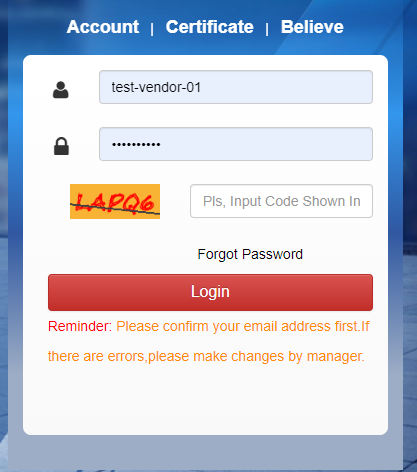
1. Platform login issues There are currently three authentication methods for logging in: l Account password+email verification code l Certificate (requires certificateapplication) l Believe (Foxconn internal personnel) Common problems include: I. Email maintenance error, unable to log into the system. In this case, please contact the administrator and provide the systemlogin account and the correct email address that needs to be bound to theadministrator. After binding, the administrator can use this email address toreceive the verification code. II. Email maintenance is correct, but unableto receive email verification code. In thissituation, it is recommended to self check the network environment, email receiving tools, andfirewall settings to confirm if they have been intercepted; Or switch toanother email for testing. III. You can log in to the system, but you willneed to modify the bound email address in the future. In thiscase, there is no need to contact the administrator and you can make modifications on your own. Themodification path is: Enterprise Center - Enterprise Management - AccountInformation. If an account needs to be bound to multiple email addresses,please separate them with English commas (,). For example: 123@qq.com ,456@163.com IV. Forgot password, unable to log in to thesystem. You can setit through the forgot password function on the login page, as shown in the following figure: 2. Certificate application issues Thereare currently two types of certificates: l Tianwei Integrity (External Supplier) Applicationsteps: After logging into the platform, check in the Certificate section of theEnterprise Center. The overall process includes: 1.Pay and fill out the application form 2.Submit application information 3.Platform review and certification 4.Download and install certificate 5.Bind certificate l Digital signature (Foxconn internalsupplier) Thecertificate application requires filling out an application form at the DigitalManagement Center, which can be found at: https://esign.efoxconn.com/ Theoverall steps are divided into: 1.Fill in application information 2.Review 3.Issuing certificates 4.User certificate download and installation 5.Bind certificate 3. Invoice issuance issues Theinvoice issuance methods in the system are divided into: ü Excel template opening Ifyou choose to open an Excel template, please strictly follow the templatedownload and template format to maintain the data. Whenissuing an invoice, the system prompts: When the supplier uploads the invoice,it prompts that the invoice title has not been maintained, the BU code does notexist in the system, or the vendor code does not exist in the system or uploadprompts. The above items are not bound. Please provide the login platformaccount and upload the invoice BU code, vendor code, Foxconn legalrepresentative, etc. to the administrator, and ask her to check the relevantpermissions of the account. ü Scan method Sameas above. 4. Invoice inquiry issues Ifencountering the inability to query associated invoice data, it is generallydivided into two: Accountpermission issue: Please provide our system administrator with the loginaccount, BU for uploading invoices, Vendor code, Foxconn legal representative,and other four items, and ask her to bind the relevant account permissions. Theplatform is divided into regular query and historical invoice query: Forinvoice data with an upload date of one and a half years, please query on theregular information query page. For invoice data with an upload date of morethan one and a half years, please query on the historical invoice query node. 5. Invoice rejection or transfer issues l Refusal of invoice Beforerejecting an invoice, please confirm whether the invoice is locked. On theinvoice information query page, check the invoice data information and confirmthe eVoucher and ERP lock status. The prerequisite for rejecting an invoice isthat both of these statuses are "N". Otherwise, please go to thecorresponding system to unlock it first. After the system status is reset to"N", the administrator can refuse. EVoucherlock refers to the invoice being obtained in the electronic signature system.The unlocking method is to enter the invoice number, legal representative code,and manufacturer code on the personal settings unlock invoice page in theelectronic signature system to unlock it; ERPlocking refers to the situation where invoice data information has been sent toSAP, Tiptop, or SSI systems. The unlocking method is to reject invoices ondifferent production management hosts based on which one you use. l Throwing problem Ifthe invoice data is not transferred to the docking system, the eVoucher lockand ERP lock states will always be "N". Needto confirm: Firstly, whether the invoice status is in the "Invoice Confirm"state; Secondly, confirm whether the system is integrated with our system. TheeVoucher lock directly obtains invoice data through electronic signature. Aftersuccessful acquisition, the eVoucher lock field will automatically change from “N”to “Y” ERPlocking is an automatic system transfer, usually every 2 hours. At the end ofeach month, the invoice transfer time is around 3-4 hours. Ifthe invoice has not been submitted to ERP for a long time, please first checkwhether the invoice quantity, unit price, tax rate and other field informationare normal. If they are normal, please send an email to IT and investigate theroot cause of the non submission. |